# Windows 11X Start Menu
**Published:** August 9, 2024
**Author:** VIN STAR
**Categories:** Windows 11 Mod Styles, Windows 11 Start Menu Styler
**Tags:** Windhawk Mod Styles
---
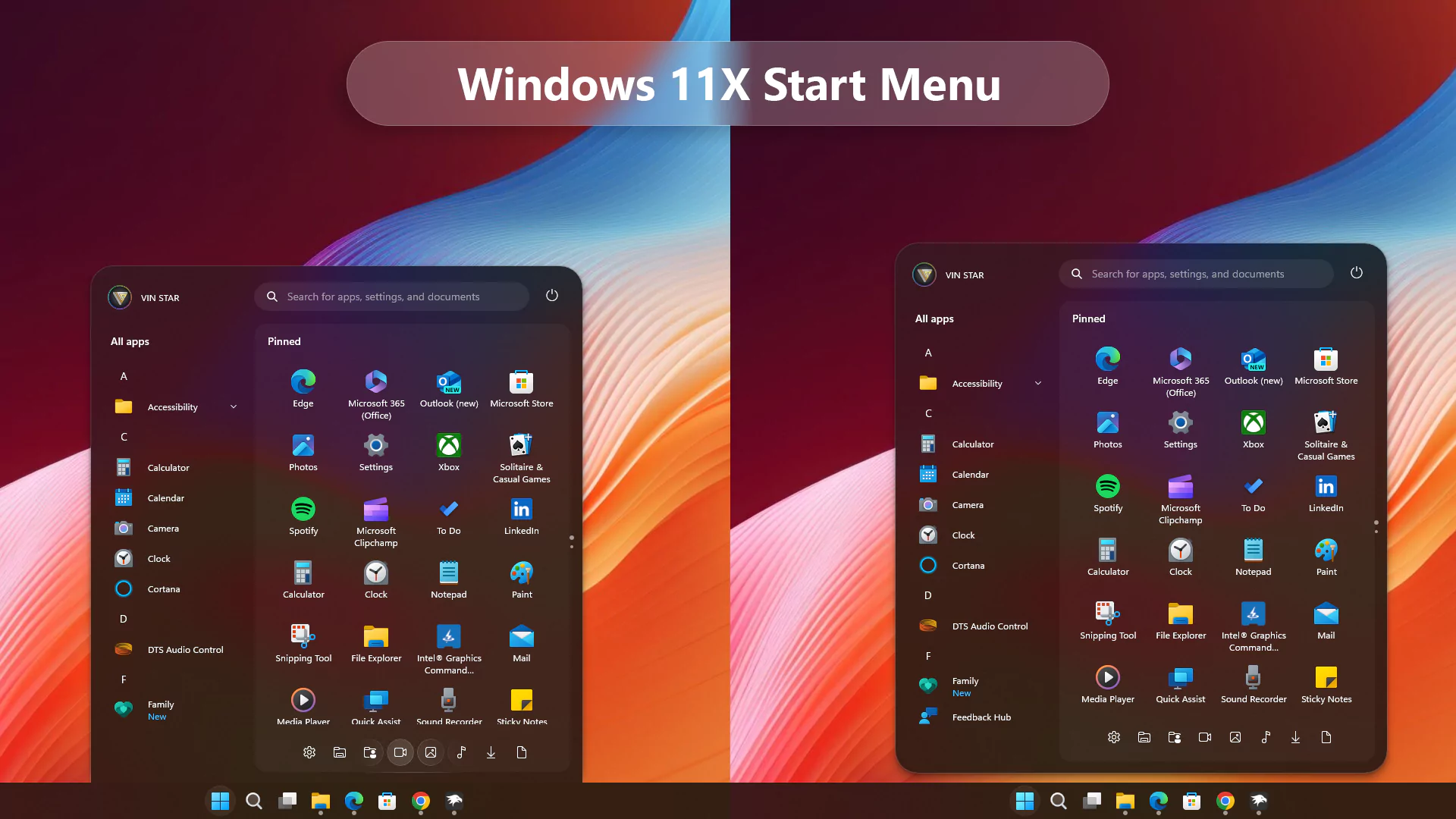
## Windows 11X Start Menu for Windows 11
Transform your Windows 11 Start Menu to achieve a sleek Windows 11X look by following these simple steps using the Windows 11 Start Menu Styler Windhawk mod. This guide will walk you through the installation and customization process to enhance your Start Menu’s appearance effortlessly.
> ### Steps to Install Windhawk and the Mod:
>
>
> - Download and install [Windhawk](https://windhawk.net/).
> - Open Windhawk and go to “Explore” in the upper right menu.
> - Search for “Windows 11 Start Menu Styler” and click “Details.”
> - Click “Install” and accept any pop-ups.
> - After installing the mod:
>
>
> Open the “Settings” tab → paste the YAML-formatted code into “Textual mode” or
>
> Open the “Advanced” tab → paste the JSON-formatted code into “Mod settings”
## Windows 11X Start Menu
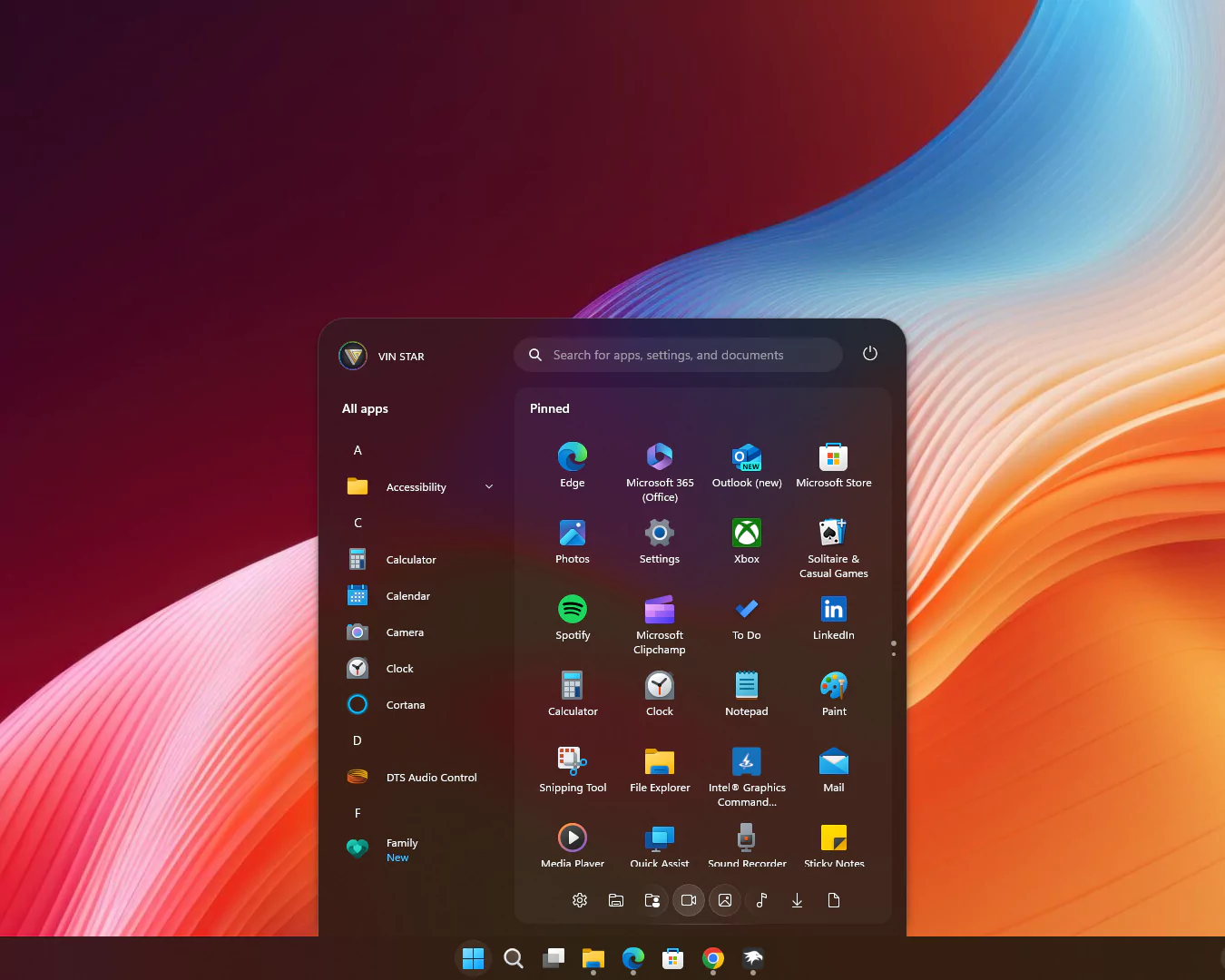
**Start Menu**
```yaml
theme: VinStar
disableNewStartMenuLayout: legacyClassicLayout
styleConstants:
- Background=
- BorderBrush=
- BorderThickness=1
- CornerRadius=99
- CornerRadius2=20
- CornerRadius3=30,30,0,0
- FlowDirection=0
- Margin=2
- Margin2=0,0,0,-15
- Visibility=Visible
- Visibility2=Collapsed
controlStyles:
- target: Windows.UI.Xaml.Controls.Grid#UndockedRoot
styles:
- Margin=200,-10,0,0
- Visibility=$Visibility
- Width=450
- target: Windows.UI.Xaml.Controls.Grid#AllAppsRoot
styles:
- Margin=180,0,-220,0
- Transform3D:=
- Visibility=$Visibility
- Width=290
- target: Windows.UI.Xaml.Controls.Button#CloseAllAppsButton
styles:
- Visibility=$Visibility2
- target: StartDocked.StartSizingFrame
styles:
- MaxHeight=670
- MaxWidth=650
- MinWidth=650
- target: Windows.UI.Xaml.Controls.Grid#ShowMoreSuggestions
styles:
- Visibility=$Visibility2
- target: Windows.UI.Xaml.Controls.Button#ShowAllAppsButton
styles:
- Visibility=$Visibility2
- target: Windows.UI.Xaml.Controls.GridView#RecommendedList > Windows.UI.Xaml.Controls.Border > Windows.UI.Xaml.Controls.ScrollViewer#ScrollViewer > Windows.UI.Xaml.Controls.Border#Root > Windows.UI.Xaml.Controls.Grid > Windows.UI.Xaml.Controls.ScrollContentPresenter#ScrollContentPresenter > Windows.UI.Xaml.Controls.ItemsPresenter > Windows.UI.Xaml.Controls.ItemsWrapGrid > Windows.UI.Xaml.Controls.GridViewItem
styles:
- Margin=0,0,0,0
- MaxWidth=190
- MinWidth=190
- target: StartDocked.AllAppsGridListView#AppsList
styles:
- Padding=90,3,6,16
- target: Windows.UI.Xaml.Controls.Grid#AllAppsPaneHeader
styles:
- Margin=97,-10,0,0
- target: Windows.UI.Xaml.Controls.Grid#SuggestionsParentContainer
styles:
- Margin=-20,0,0,0
- Visibility=$Visibility2
- target: StartDocked.NavigationPaneView#NavigationPane
styles:
- FlowDirection=$FlowDirection
- Margin=30,0,30,0
- target: StartDocked.PowerOptionsView
styles:
- CornerRadius=$CornerRadius
- Margin=0,-1196,-10,0
- target: Windows.UI.Xaml.Controls.ItemsStackPanel
styles:
- FlowDirection=1
- target: Windows.UI.Xaml.Controls.ListViewItem
styles:
- FlowDirection=$FlowDirection
- target: Windows.UI.Xaml.Controls.ItemsStackPanel > Windows.UI.Xaml.Controls.ListViewItem
styles:
- FlowDirection=$FlowDirection
- target: StartDocked.SearchBoxToggleButton#StartMenuSearchBox
styles:
- Margin=23,-101,23,-514
- target: Windows.UI.Xaml.Controls.TextBlock#NoSuggestionsWithoutSettingsLink
styles:
- Margin=11,0,48,0
- target: StartDocked.LauncherFrame > Windows.UI.Xaml.Controls.Grid#RootGrid > Windows.UI.Xaml.Controls.Grid#RootContent > Windows.UI.Xaml.Controls.Grid#MainContent > Windows.UI.Xaml.Controls.Grid#InnerContent > Windows.UI.Xaml.Shapes.Rectangle
styles:
- Margin=67,7,0,21
- target: Windows.UI.Xaml.Controls.SemanticZoom#ZoomControl
styles:
- IsZoomOutButtonEnabled=true
- target: Windows.UI.Xaml.Controls.Button#ZoomOutButton > Windows.UI.Xaml.Controls.ContentPresenter#ContentPresenter > Windows.UI.Xaml.Controls.TextBlock
styles:
- Text=
- target: Windows.UI.Xaml.Controls.Button#ZoomOutButton
styles:
- Background=Transparent
- BorderBrush=Transparent
- CornerRadius=4
- FontSize=14
- Height=28
- Margin=0,-36,10,0
- VerticalAlignment=0
- Width=28
- target: Windows.UI.Xaml.Controls.ListView#ZoomAppsList
styles:
- Padding=86,0,27,0
- target: StartDocked.SearchBoxToggleButton
styles:
- CornerRadius=$CornerRadius2
- Height=38
- Margin=215,-10,70,30
- target: StartMenu.PinnedList
styles:
- Height=480
- target: Windows.UI.Xaml.Controls.TextBlock#PinnedListHeaderText
styles:
- Margin=-30,0,0,0
- Visibility=$Visibility
- target: Windows.UI.Xaml.Controls.Grid#TopLevelSuggestionsListHeader
styles:
- Visibility=$Visibility2
- target: Windows.UI.Xaml.Controls.Border#ContentBorder > Windows.UI.Xaml.Controls.Grid#DroppedFlickerWorkaroundWrapper > Border@CommonStates
styles:
- Background:=$Background
- BorderBrush:=$BorderBrush
- BorderBrush@Active:=
- Margin=1
- target: Windows.UI.Xaml.Controls.Border#ContentBorder > Windows.UI.Xaml.Controls.Grid#DroppedFlickerWorkaroundWrapper > Border#BackgroundBorder
styles:
- Background:=
- Margin=$Margin
- target: Rectangle[4]
styles:
- Margin=0,-20,0,0
- target: Border#AcrylicBorder
styles:
- BorderThickness=1,1,1,0
- CornerRadius=$CornerRadius3
- Margin=$Margin2
- target: Border#AcrylicOverlay
styles:
- BorderBrush:=$BorderBrush
- BorderThickness=$BorderThickness
- CornerRadius=15
- Margin=215,75,15,-64
- target: Border#DropShadow
styles:
- CornerRadius=$CornerRadius3
- Margin=$Margin2
- target: Border#DropShadowDismissTarget
styles:
- CornerRadius=$CornerRadius3
- Margin=$Margin2
- target: StartDocked.PowerOptionsView > StartDocked.NavigationPaneButton > Grid > Border
styles:
- CornerRadius=$CornerRadius
- Margin=2,3,2,0
- target: StartDocked.UserTileView
styles:
- Margin=-20,-1190,0,0
- target: StartDocked.UserTileView > StartDocked.NavigationPaneButton > Grid > Border
styles:
- CornerRadius=$CornerRadius2
- Margin=8,0,0,0
- target: StartDocked.SearchBoxToggleButton > Grid > Border
styles:
- Background=#11ffffff
- target: StartDocked.LauncherFrame > Grid#RootGrid > Grid#RootContent > Grid#MainContent > Grid#InnerContent > Rectangle
styles:
- Visibility=$Visibility2
- target: StartDocked.NavigationPaneView
styles:
- Height=50
- target: StartDocked.AppListView#NavigationPanePlacesListView
styles:
- Margin=0,10,0,0
- target: StartDocked.AppListViewItem > Grid
styles:
- Background:=$Background
- BorderBrush:=
- BorderThickness=$BorderThickness
- Margin=$Margin
- target: StartDocked.AppListViewItem > Grid#ContentBorder@CommonStates
styles:
- CornerRadius=$CornerRadius2
- target: MenuFlyoutPresenter
styles:
- BorderBrush:=$BorderBrush
- BorderThickness=$BorderThickness
- target: Windows.UI.Xaml.Controls.FlyoutPresenter[1]
styles:
- Transform3D:=
```
## Windows 11X Float Start Menu
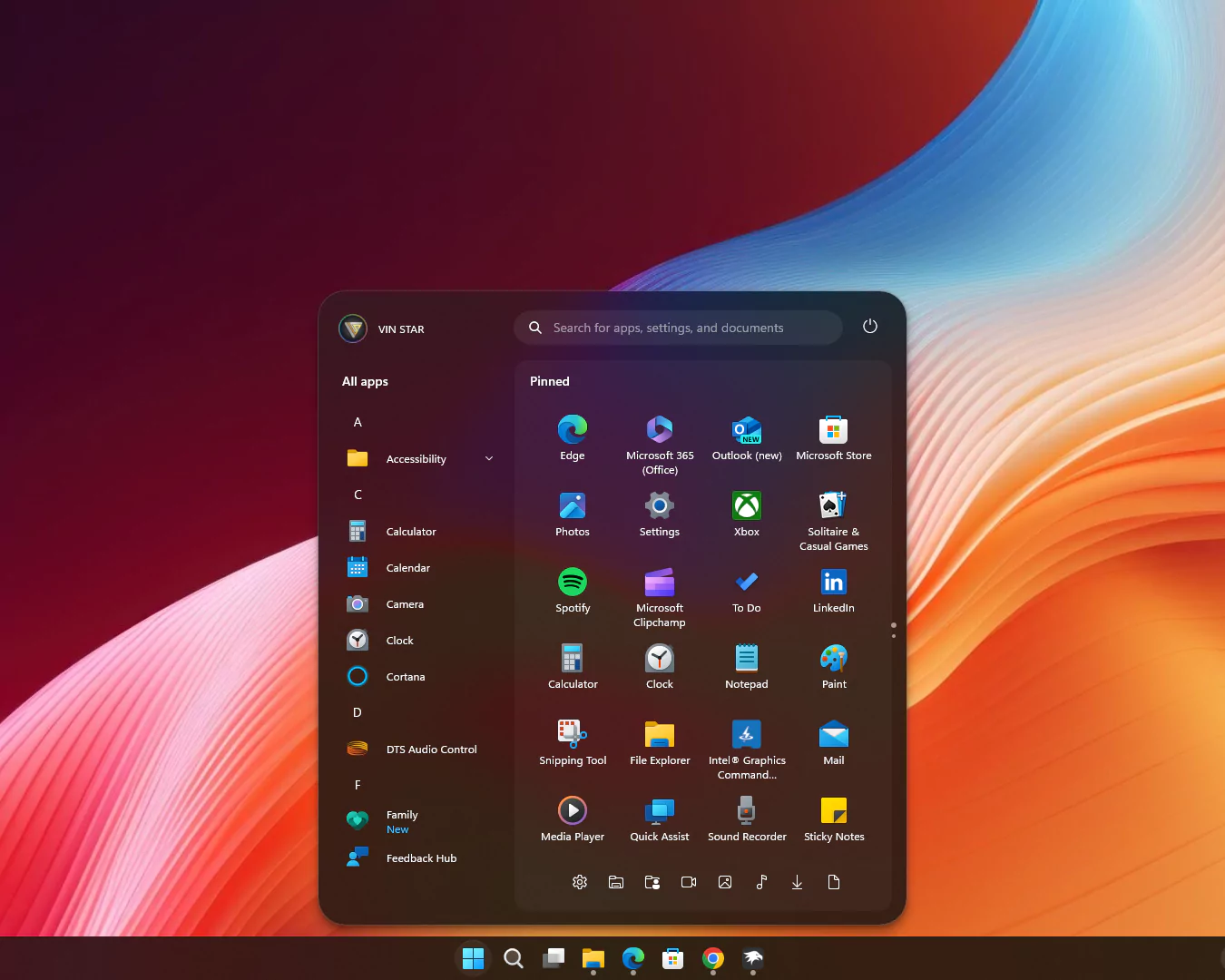
**Float Start Menu**
```yaml
theme: VinStar
disableNewStartMenuLayout: legacyClassicLayout
styleConstants:
- Background=
- BorderBrush=
- BorderThickness=1
- CornerRadius=99
- CornerRadius2=20
- CornerRadius3=30
- FlowDirection=0
- Margin=2
- Margin2=0
- Visibility=Visible
- Visibility2=Collapsed
controlStyles:
- target: Windows.UI.Xaml.Controls.Grid#UndockedRoot
styles:
- Margin=200,-10,0,0
- Visibility=$Visibility
- Width=450
- target: Windows.UI.Xaml.Controls.Grid#AllAppsRoot
styles:
- Margin=180,0,-220,0
- Transform3D:=
- Visibility=$Visibility
- Width=290
- target: Windows.UI.Xaml.Controls.Button#CloseAllAppsButton
styles:
- Visibility=$Visibility2
- target: StartDocked.StartSizingFrame
styles:
- MaxHeight=700
- MaxWidth=650
- MinWidth=650
- target: Windows.UI.Xaml.Controls.Grid#ShowMoreSuggestions
styles:
- Visibility=$Visibility2
- target: Windows.UI.Xaml.Controls.Button#ShowAllAppsButton
styles:
- Visibility=$Visibility2
- target: Windows.UI.Xaml.Controls.GridView#RecommendedList > Windows.UI.Xaml.Controls.Border > Windows.UI.Xaml.Controls.ScrollViewer#ScrollViewer > Windows.UI.Xaml.Controls.Border#Root > Windows.UI.Xaml.Controls.Grid > Windows.UI.Xaml.Controls.ScrollContentPresenter#ScrollContentPresenter > Windows.UI.Xaml.Controls.ItemsPresenter > Windows.UI.Xaml.Controls.ItemsWrapGrid > Windows.UI.Xaml.Controls.GridViewItem
styles:
- Margin=0,0,0,0
- MaxWidth=190
- MinWidth=190
- target: StartDocked.AllAppsGridListView#AppsList
styles:
- Padding=90,3,6,16
- target: Windows.UI.Xaml.Controls.Grid#AllAppsPaneHeader
styles:
- Margin=97,-10,0,0
- target: Windows.UI.Xaml.Controls.Grid#SuggestionsParentContainer
styles:
- Margin=-20,0,0,0
- Visibility=$Visibility2
- target: StartDocked.NavigationPaneView#NavigationPane
styles:
- FlowDirection=$FlowDirection
- Margin=30,0,30,0
- target: StartDocked.PowerOptionsView
styles:
- CornerRadius=$CornerRadius
- Margin=0,-1256,-10,0
- target: Windows.UI.Xaml.Controls.ItemsStackPanel
styles:
- FlowDirection=1
- target: Windows.UI.Xaml.Controls.ListViewItem
styles:
- FlowDirection=$FlowDirection
- target: Windows.UI.Xaml.Controls.ItemsStackPanel > Windows.UI.Xaml.Controls.ListViewItem
styles:
- FlowDirection=$FlowDirection
- target: StartDocked.SearchBoxToggleButton#StartMenuSearchBox
styles:
- Margin=23,-101,23,-514
- target: Windows.UI.Xaml.Controls.TextBlock#NoSuggestionsWithoutSettingsLink
styles:
- Margin=11,0,48,0
- target: StartDocked.LauncherFrame > Windows.UI.Xaml.Controls.Grid#RootGrid > Windows.UI.Xaml.Controls.Grid#RootContent > Windows.UI.Xaml.Controls.Grid#MainContent > Windows.UI.Xaml.Controls.Grid#InnerContent > Windows.UI.Xaml.Shapes.Rectangle
styles:
- Margin=67,7,0,21
- target: Windows.UI.Xaml.Controls.SemanticZoom#ZoomControl
styles:
- IsZoomOutButtonEnabled=true
- target: Windows.UI.Xaml.Controls.Button#ZoomOutButton > Windows.UI.Xaml.Controls.ContentPresenter#ContentPresenter > Windows.UI.Xaml.Controls.TextBlock
styles:
- Text=
- target: Windows.UI.Xaml.Controls.Button#ZoomOutButton
styles:
- Background=Transparent
- BorderBrush=Transparent
- CornerRadius=4
- FontSize=14
- Height=28
- Margin=0,-36,10,0
- VerticalAlignment=0
- Width=28
- target: Windows.UI.Xaml.Controls.ListView#ZoomAppsList
styles:
- Padding=86,0,27,0
- target: StartDocked.SearchBoxToggleButton
styles:
- CornerRadius=$CornerRadius2
- Height=38
- Margin=215,-10,70,30
- target: StartMenu.PinnedList
styles:
- Height=500
- target: Windows.UI.Xaml.Controls.TextBlock#PinnedListHeaderText
styles:
- Margin=-30,0,0,0
- Visibility=$Visibility
- target: Windows.UI.Xaml.Controls.Grid#TopLevelSuggestionsListHeader
styles:
- Visibility=$Visibility2
- target: Windows.UI.Xaml.Controls.Border#ContentBorder > Windows.UI.Xaml.Controls.Grid#DroppedFlickerWorkaroundWrapper > Border@CommonStates
styles:
- Background:=$Background
- BorderBrush:=$BorderBrush
- BorderBrush@Active:=
- Margin=1
- target: Windows.UI.Xaml.Controls.Border#ContentBorder > Windows.UI.Xaml.Controls.Grid#DroppedFlickerWorkaroundWrapper > Border#BackgroundBorder
styles:
- Background:=
- Margin=$Margin
- target: Rectangle[4]
styles:
- Margin=0,-20,0,0
- target: Border#AcrylicBorder
styles:
- BorderThickness=$BorderThickness
- CornerRadius=$CornerRadius3
- Margin=$Margin2
- target: Border#AcrylicOverlay
styles:
- BorderBrush:=$BorderBrush
- BorderThickness=$BorderThickness
- CornerRadius=15
- Margin=215,75,15,-50
- target: Border#DropShadow
styles:
- CornerRadius=$CornerRadius3
- Margin=$Margin2
- target: Border#DropShadowDismissTarget
styles:
- CornerRadius=$CornerRadius3
- Margin=$Margin2
- target: StartDocked.PowerOptionsView > StartDocked.NavigationPaneButton > Grid > Border
styles:
- CornerRadius=$CornerRadius
- Margin=2,3,2,0
- target: StartDocked.UserTileView
styles:
- Margin=-20,-1250,0,0
- target: StartDocked.UserTileView > StartDocked.NavigationPaneButton > Grid > Border
styles:
- CornerRadius=$CornerRadius2
- Margin=8,0,0,0
- target: StartDocked.SearchBoxToggleButton > Grid > Border
styles:
- Background=#11ffffff
- target: StartDocked.LauncherFrame > Grid#RootGrid > Grid#RootContent > Grid#MainContent > Grid#InnerContent > Rectangle
styles:
- Visibility=$Visibility2
- target: StartDocked.NavigationPaneView
styles:
- Height=50
- target: StartDocked.AppListView#NavigationPanePlacesListView
styles:
- Margin=0,-30,0,0
- target: StartDocked.AppListViewItem > Grid
styles:
- Background:=$Background
- BorderBrush:=
- BorderThickness=$BorderThickness
- Margin=$Margin
- target: StartDocked.AppListViewItem > Grid#ContentBorder@CommonStates
styles:
- CornerRadius=$CornerRadius2
- target: MenuFlyoutPresenter
styles:
- BorderBrush:=$BorderBrush
- BorderThickness=$BorderThickness
- target: Windows.UI.Xaml.Controls.FlyoutPresenter[1]
styles:
- Transform3D:=
```
## Conclusion
By following these steps, you can easily transform your Windows 11 Start Menu to resemble the modern and sleek Windows 11X concept style. This customization not only enhances the visual appeal but also provides a refreshed user experience, making your Start Menu more enjoyable and functional.
---
**Original URL:** https://www.vinstartheme.com/windows-11x-start-menu/