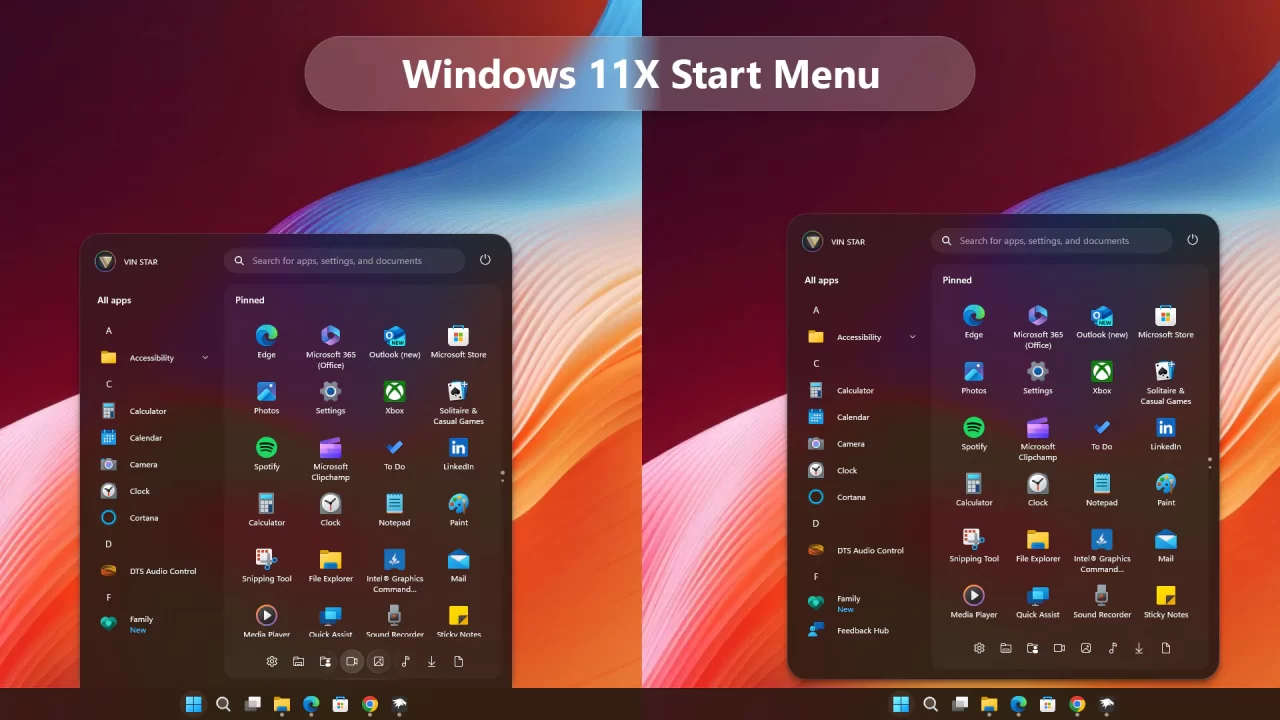
Windows 11X Start Menu for Windows 11
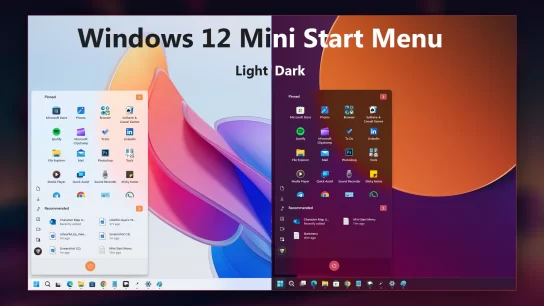
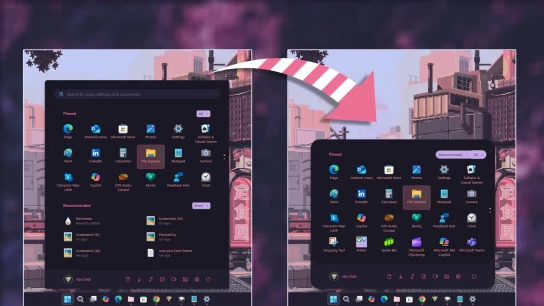
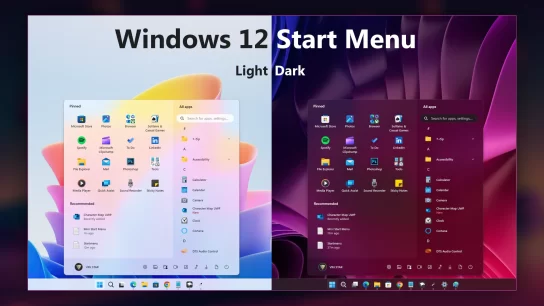
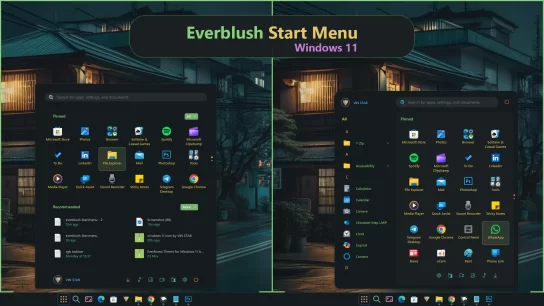
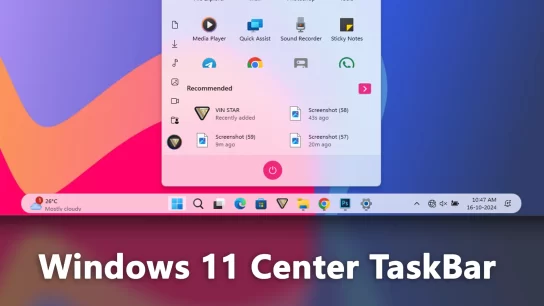
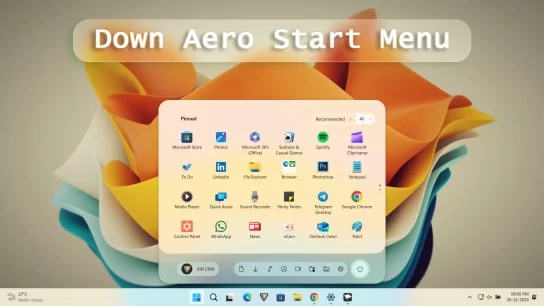
Transform your Windows 11 Start Menu to achieve a sleek Windows 11X look by following these simple steps using the Windows 11 Start Menu Styler Windhawk mod. This guide will walk you through the installation and customization process to enhance your Start Menu’s appearance effortlessly.
Steps to Install Windhawk and the Mod:
- Download and install Windhawk.
- Open Windhawk and go to “Explore” in the upper right menu.
- Search for “Windows 11 Start Menu Styler” and click “Details.”
- Click “Install” and accept any pop-ups.
- After installing the mod:
Open the “Settings” tab → paste the YAML-formatted code into “Textual mode” or
Open the “Advanced” tab → paste the JSON-formatted code into “Mod settings”
Windows 11X Start Menu
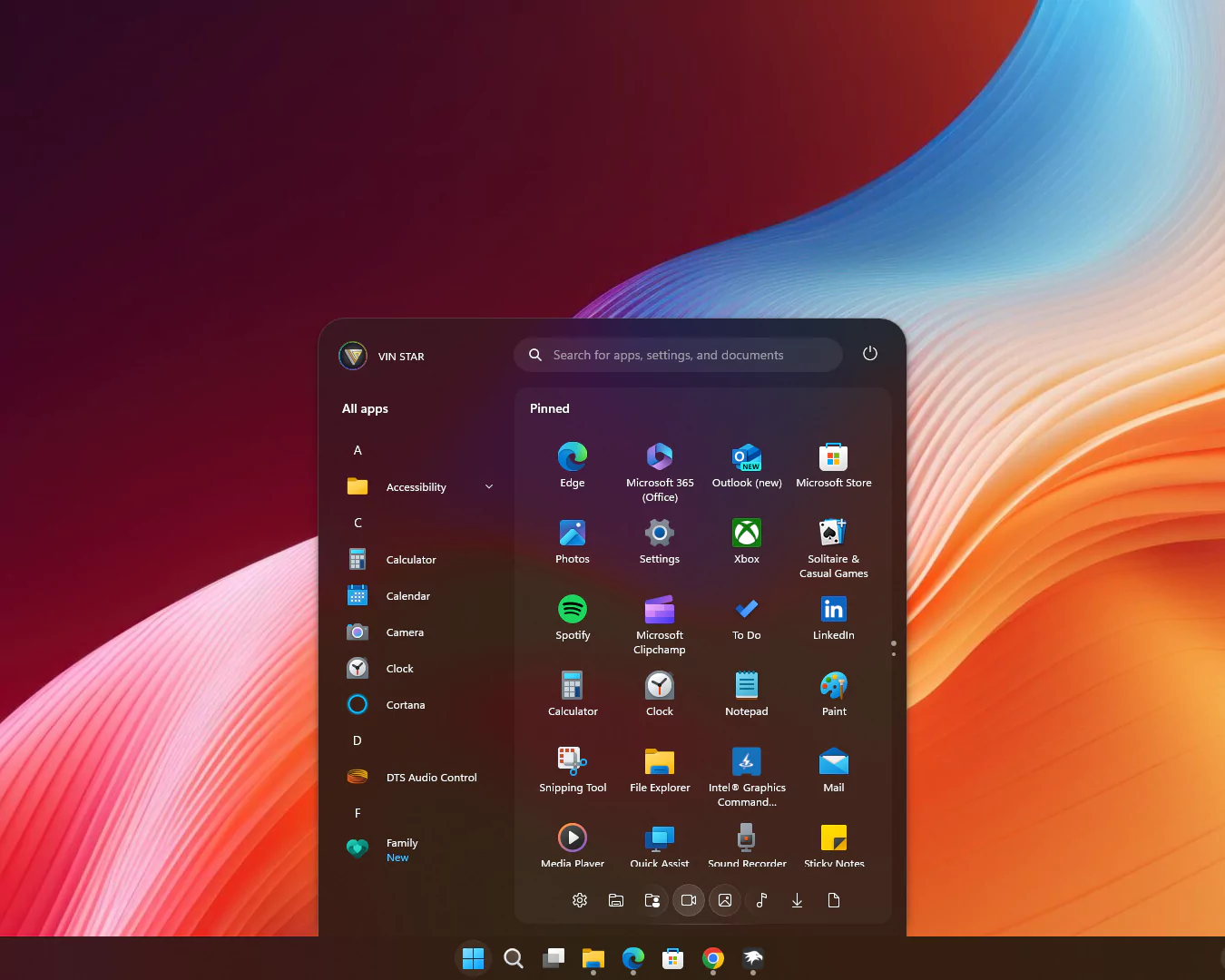
theme: VinStar
disableNewStartMenuLayout: legacyClassicLayout
styleConstants:
  - Background=<RevealBorderBrush Color="Transparent" TargetTheme="1" Opacity="0.3"/>
  - BorderBrush=<RevealBorderBrush Color="Transparent" TargetTheme="1" Opacity="0.8"/>
  - BorderThickness=1
  - CornerRadius=99
  - CornerRadius2=20
  - CornerRadius3=30,30,0,0
  - FlowDirection=0
  - Margin=2
  - Margin2=0,0,0,-15
  - Visibility=Visible
  - Visibility2=Collapsed
controlStyles:
  - target: Windows.UI.Xaml.Controls.Grid#UndockedRoot
    styles:
      - Margin=200,-10,0,0
      - Visibility=$Visibility
      - Width=450
  - target: Windows.UI.Xaml.Controls.Grid#AllAppsRoot
    styles:
      - Margin=180,0,-220,0
      - Transform3D:=<CompositeTransform3D TranslateX="-1100" />
      - Visibility=$Visibility
      - Width=290
  - target: Windows.UI.Xaml.Controls.Button#CloseAllAppsButton
    styles:
      - Visibility=$Visibility2
  - target: StartDocked.StartSizingFrame
    styles:
      - MaxHeight=670
      - MaxWidth=650
      - MinWidth=650
  - target: Windows.UI.Xaml.Controls.Grid#ShowMoreSuggestions
    styles:
      - Visibility=$Visibility2
  - target: Windows.UI.Xaml.Controls.Button#ShowAllAppsButton
    styles:
      - Visibility=$Visibility2
  - target: Windows.UI.Xaml.Controls.GridView#RecommendedList > Windows.UI.Xaml.Controls.Border > Windows.UI.Xaml.Controls.ScrollViewer#ScrollViewer > Windows.UI.Xaml.Controls.Border#Root > Windows.UI.Xaml.Controls.Grid > Windows.UI.Xaml.Controls.ScrollContentPresenter#ScrollContentPresenter > Windows.UI.Xaml.Controls.ItemsPresenter > Windows.UI.Xaml.Controls.ItemsWrapGrid > Windows.UI.Xaml.Controls.GridViewItem
    styles:
      - Margin=0,0,0,0
      - MaxWidth=190
      - MinWidth=190
  - target: StartDocked.AllAppsGridListView#AppsList
    styles:
      - Padding=90,3,6,16
  - target: Windows.UI.Xaml.Controls.Grid#AllAppsPaneHeader
    styles:
      - Margin=97,-10,0,0
  - target: Windows.UI.Xaml.Controls.Grid#SuggestionsParentContainer
    styles:
      - Margin=-20,0,0,0
      - Visibility=$Visibility2
  - target: StartDocked.NavigationPaneView#NavigationPane
    styles:
      - FlowDirection=$FlowDirection
      - Margin=30,0,30,0
  - target: StartDocked.PowerOptionsView
    styles:
      - CornerRadius=$CornerRadius
      - Margin=0,-1196,-10,0
  - target: Windows.UI.Xaml.Controls.ItemsStackPanel
    styles:
      - FlowDirection=1
  - target: Windows.UI.Xaml.Controls.ListViewItem
    styles:
      - FlowDirection=$FlowDirection
  - target: Windows.UI.Xaml.Controls.ItemsStackPanel > Windows.UI.Xaml.Controls.ListViewItem
    styles:
      - FlowDirection=$FlowDirection
  - target: StartDocked.SearchBoxToggleButton#StartMenuSearchBox
    styles:
      - Margin=23,-101,23,-514
  - target: Windows.UI.Xaml.Controls.TextBlock#NoSuggestionsWithoutSettingsLink
    styles:
      - Margin=11,0,48,0
  - target: StartDocked.LauncherFrame > Windows.UI.Xaml.Controls.Grid#RootGrid > Windows.UI.Xaml.Controls.Grid#RootContent > Windows.UI.Xaml.Controls.Grid#MainContent > Windows.UI.Xaml.Controls.Grid#InnerContent > Windows.UI.Xaml.Shapes.Rectangle
    styles:
      - Margin=67,7,0,21
  - target: Windows.UI.Xaml.Controls.SemanticZoom#ZoomControl
    styles:
      - IsZoomOutButtonEnabled=true
  - target: Windows.UI.Xaml.Controls.Button#ZoomOutButton > Windows.UI.Xaml.Controls.ContentPresenter#ContentPresenter > Windows.UI.Xaml.Controls.TextBlock
    styles:
      - Text=
  - target: Windows.UI.Xaml.Controls.Button#ZoomOutButton
    styles:
      - Background=Transparent
      - BorderBrush=Transparent
      - CornerRadius=4
      - FontSize=14
      - Height=28
      - Margin=0,-36,10,0
      - VerticalAlignment=0
      - Width=28
  - target: Windows.UI.Xaml.Controls.ListView#ZoomAppsList
    styles:
      - Padding=86,0,27,0
  - target: StartDocked.SearchBoxToggleButton
    styles:
      - CornerRadius=$CornerRadius2
      - Height=38
      - Margin=215,-10,70,30
  - target: StartMenu.PinnedList
    styles:
      - Height=480
  - target: Windows.UI.Xaml.Controls.TextBlock#PinnedListHeaderText
    styles:
      - Margin=-30,0,0,0
      - Visibility=$Visibility
  - target: Windows.UI.Xaml.Controls.Grid#TopLevelSuggestionsListHeader
    styles:
      - Visibility=$Visibility2
  - target: Windows.UI.Xaml.Controls.Border#ContentBorder > Windows.UI.Xaml.Controls.Grid#DroppedFlickerWorkaroundWrapper > Border@CommonStates
    styles:
      - Background:=$Background
      - BorderBrush:=$BorderBrush
      - BorderBrush@Active:=<RevealBorderBrush Color="White" TargetTheme="1" Opacity="0.3"/>
      - Margin=1
  - target: Windows.UI.Xaml.Controls.Border#ContentBorder > Windows.UI.Xaml.Controls.Grid#DroppedFlickerWorkaroundWrapper > Border#BackgroundBorder
    styles:
      - Background:=<RevealBorderBrush Color="Transparent" TargetTheme="0" Opacity=".1"/>
      - Margin=$Margin
  - target: Rectangle[4]
    styles:
      - Margin=0,-20,0,0
  - target: Border#AcrylicBorder
    styles:
      - BorderThickness=1,1,1,0
      - CornerRadius=$CornerRadius3
      - Margin=$Margin2
  - target: Border#AcrylicOverlay
    styles:
      - BorderBrush:=$BorderBrush
      - BorderThickness=$BorderThickness
      - CornerRadius=15
      - Margin=215,75,15,-64
  - target: Border#DropShadow
    styles:
      - CornerRadius=$CornerRadius3
      - Margin=$Margin2
  - target: Border#DropShadowDismissTarget
    styles:
      - CornerRadius=$CornerRadius3
      - Margin=$Margin2
  - target: StartDocked.PowerOptionsView > StartDocked.NavigationPaneButton > Grid > Border
    styles:
      - CornerRadius=$CornerRadius
      - Margin=2,3,2,0
  - target: StartDocked.UserTileView
    styles:
      - Margin=-20,-1190,0,0
  - target: StartDocked.UserTileView > StartDocked.NavigationPaneButton > Grid > Border
    styles:
      - CornerRadius=$CornerRadius2
      - Margin=8,0,0,0
  - target: StartDocked.SearchBoxToggleButton > Grid > Border
    styles:
      - Background=#11ffffff
  - target: StartDocked.LauncherFrame > Grid#RootGrid > Grid#RootContent > Grid#MainContent > Grid#InnerContent > Rectangle
    styles:
      - Visibility=$Visibility2
  - target: StartDocked.NavigationPaneView
    styles:
      - Height=50
  - target: StartDocked.AppListView#NavigationPanePlacesListView
    styles:
      - Margin=0,10,0,0
  - target: StartDocked.AppListViewItem > Grid
    styles:
      - Background:=$Background
      - BorderBrush:=<RevealBorderBrush Color="Transparent" TargetTheme="1" Opacity="1"/>
      - BorderThickness=$BorderThickness
      - Margin=$Margin
  - target: StartDocked.AppListViewItem > Grid#ContentBorder@CommonStates
    styles:
      - CornerRadius=$CornerRadius2
  - target: MenuFlyoutPresenter
    styles:
      - BorderBrush:=$BorderBrush
      - BorderThickness=$BorderThickness
  - target: Windows.UI.Xaml.Controls.FlyoutPresenter[1]
    styles:
      - Transform3D:=<CompositeTransform3D  TranslateX="50"/>
Paste the code into the Settings > Textual Mode.
Windows 11X Float Start Menu
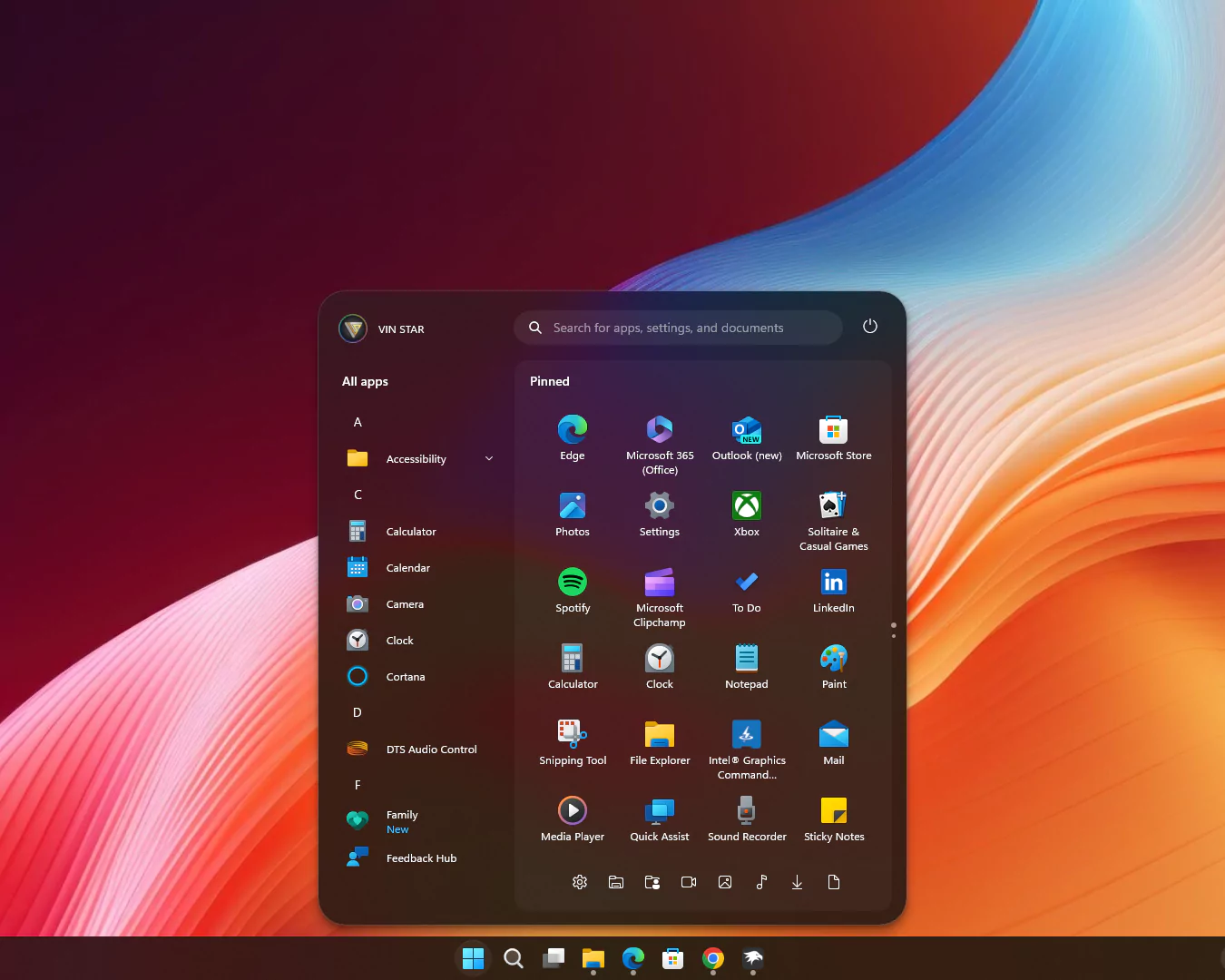
theme: VinStar
disableNewStartMenuLayout: legacyClassicLayout
styleConstants:
  - Background=<RevealBorderBrush Color="Transparent" TargetTheme="1" Opacity="0.3"/>
  - BorderBrush=<RevealBorderBrush Color="Transparent" TargetTheme="1" Opacity="0.8"/>
  - BorderThickness=1
  - CornerRadius=99
  - CornerRadius2=20
  - CornerRadius3=30
  - FlowDirection=0
  - Margin=2
  - Margin2=0
  - Visibility=Visible
  - Visibility2=Collapsed
controlStyles:
  - target: Windows.UI.Xaml.Controls.Grid#UndockedRoot
    styles:
      - Margin=200,-10,0,0
      - Visibility=$Visibility
      - Width=450
  - target: Windows.UI.Xaml.Controls.Grid#AllAppsRoot
    styles:
      - Margin=180,0,-220,0
      - Transform3D:=<CompositeTransform3D TranslateX="-1100" />
      - Visibility=$Visibility
      - Width=290
  - target: Windows.UI.Xaml.Controls.Button#CloseAllAppsButton
    styles:
      - Visibility=$Visibility2
  - target: StartDocked.StartSizingFrame
    styles:
      - MaxHeight=700
      - MaxWidth=650
      - MinWidth=650
  - target: Windows.UI.Xaml.Controls.Grid#ShowMoreSuggestions
    styles:
      - Visibility=$Visibility2
  - target: Windows.UI.Xaml.Controls.Button#ShowAllAppsButton
    styles:
      - Visibility=$Visibility2
  - target: Windows.UI.Xaml.Controls.GridView#RecommendedList > Windows.UI.Xaml.Controls.Border > Windows.UI.Xaml.Controls.ScrollViewer#ScrollViewer > Windows.UI.Xaml.Controls.Border#Root > Windows.UI.Xaml.Controls.Grid > Windows.UI.Xaml.Controls.ScrollContentPresenter#ScrollContentPresenter > Windows.UI.Xaml.Controls.ItemsPresenter > Windows.UI.Xaml.Controls.ItemsWrapGrid > Windows.UI.Xaml.Controls.GridViewItem
    styles:
      - Margin=0,0,0,0
      - MaxWidth=190
      - MinWidth=190
  - target: StartDocked.AllAppsGridListView#AppsList
    styles:
      - Padding=90,3,6,16
  - target: Windows.UI.Xaml.Controls.Grid#AllAppsPaneHeader
    styles:
      - Margin=97,-10,0,0
  - target: Windows.UI.Xaml.Controls.Grid#SuggestionsParentContainer
    styles:
      - Margin=-20,0,0,0
      - Visibility=$Visibility2
  - target: StartDocked.NavigationPaneView#NavigationPane
    styles:
      - FlowDirection=$FlowDirection
      - Margin=30,0,30,0
  - target: StartDocked.PowerOptionsView
    styles:
      - CornerRadius=$CornerRadius
      - Margin=0,-1256,-10,0
  - target: Windows.UI.Xaml.Controls.ItemsStackPanel
    styles:
      - FlowDirection=1
  - target: Windows.UI.Xaml.Controls.ListViewItem
    styles:
      - FlowDirection=$FlowDirection
  - target: Windows.UI.Xaml.Controls.ItemsStackPanel > Windows.UI.Xaml.Controls.ListViewItem
    styles:
      - FlowDirection=$FlowDirection
  - target: StartDocked.SearchBoxToggleButton#StartMenuSearchBox
    styles:
      - Margin=23,-101,23,-514
  - target: Windows.UI.Xaml.Controls.TextBlock#NoSuggestionsWithoutSettingsLink
    styles:
      - Margin=11,0,48,0
  - target: StartDocked.LauncherFrame > Windows.UI.Xaml.Controls.Grid#RootGrid > Windows.UI.Xaml.Controls.Grid#RootContent > Windows.UI.Xaml.Controls.Grid#MainContent > Windows.UI.Xaml.Controls.Grid#InnerContent > Windows.UI.Xaml.Shapes.Rectangle
    styles:
      - Margin=67,7,0,21
  - target: Windows.UI.Xaml.Controls.SemanticZoom#ZoomControl
    styles:
      - IsZoomOutButtonEnabled=true
  - target: Windows.UI.Xaml.Controls.Button#ZoomOutButton > Windows.UI.Xaml.Controls.ContentPresenter#ContentPresenter > Windows.UI.Xaml.Controls.TextBlock
    styles:
      - Text=
  - target: Windows.UI.Xaml.Controls.Button#ZoomOutButton
    styles:
      - Background=Transparent
      - BorderBrush=Transparent
      - CornerRadius=4
      - FontSize=14
      - Height=28
      - Margin=0,-36,10,0
      - VerticalAlignment=0
      - Width=28
  - target: Windows.UI.Xaml.Controls.ListView#ZoomAppsList
    styles:
      - Padding=86,0,27,0
  - target: StartDocked.SearchBoxToggleButton
    styles:
      - CornerRadius=$CornerRadius2
      - Height=38
      - Margin=215,-10,70,30
  - target: StartMenu.PinnedList
    styles:
      - Height=500
  - target: Windows.UI.Xaml.Controls.TextBlock#PinnedListHeaderText
    styles:
      - Margin=-30,0,0,0
      - Visibility=$Visibility
  - target: Windows.UI.Xaml.Controls.Grid#TopLevelSuggestionsListHeader
    styles:
      - Visibility=$Visibility2
  - target: Windows.UI.Xaml.Controls.Border#ContentBorder > Windows.UI.Xaml.Controls.Grid#DroppedFlickerWorkaroundWrapper > Border@CommonStates
    styles:
      - Background:=$Background
      - BorderBrush:=$BorderBrush
      - BorderBrush@Active:=<RevealBorderBrush Color="White" TargetTheme="1" Opacity="0.3"/>
      - Margin=1
  - target: Windows.UI.Xaml.Controls.Border#ContentBorder > Windows.UI.Xaml.Controls.Grid#DroppedFlickerWorkaroundWrapper > Border#BackgroundBorder
    styles:
      - Background:=<RevealBorderBrush Color="Transparent" TargetTheme="0" Opacity=".1"/>
      - Margin=$Margin
  - target: Rectangle[4]
    styles:
      - Margin=0,-20,0,0
  - target: Border#AcrylicBorder
    styles:
      - BorderThickness=$BorderThickness
      - CornerRadius=$CornerRadius3
      - Margin=$Margin2
  - target: Border#AcrylicOverlay
    styles:
      - BorderBrush:=$BorderBrush
      - BorderThickness=$BorderThickness
      - CornerRadius=15
      - Margin=215,75,15,-50
  - target: Border#DropShadow
    styles:
      - CornerRadius=$CornerRadius3
      - Margin=$Margin2
  - target: Border#DropShadowDismissTarget
    styles:
      - CornerRadius=$CornerRadius3
      - Margin=$Margin2
  - target: StartDocked.PowerOptionsView > StartDocked.NavigationPaneButton > Grid > Border
    styles:
      - CornerRadius=$CornerRadius
      - Margin=2,3,2,0
  - target: StartDocked.UserTileView
    styles:
      - Margin=-20,-1250,0,0
  - target: StartDocked.UserTileView > StartDocked.NavigationPaneButton > Grid > Border
    styles:
      - CornerRadius=$CornerRadius2
      - Margin=8,0,0,0
  - target: StartDocked.SearchBoxToggleButton > Grid > Border
    styles:
      - Background=#11ffffff
  - target: StartDocked.LauncherFrame > Grid#RootGrid > Grid#RootContent > Grid#MainContent > Grid#InnerContent > Rectangle
    styles:
      - Visibility=$Visibility2
  - target: StartDocked.NavigationPaneView
    styles:
      - Height=50
  - target: StartDocked.AppListView#NavigationPanePlacesListView
    styles:
      - Margin=0,-30,0,0
  - target: StartDocked.AppListViewItem > Grid
    styles:
      - Background:=$Background
      - BorderBrush:=<RevealBorderBrush Color="Transparent" TargetTheme="1" Opacity="1"/>
      - BorderThickness=$BorderThickness
      - Margin=$Margin
  - target: StartDocked.AppListViewItem > Grid#ContentBorder@CommonStates
    styles:
      - CornerRadius=$CornerRadius2
  - target: MenuFlyoutPresenter
    styles:
      - BorderBrush:=$BorderBrush
      - BorderThickness=$BorderThickness
  - target: Windows.UI.Xaml.Controls.FlyoutPresenter[1]
    styles:
      - Transform3D:=<CompositeTransform3D TranslateX="50"/>
Paste the code into the Settings > Textual Mode.
Conclusion
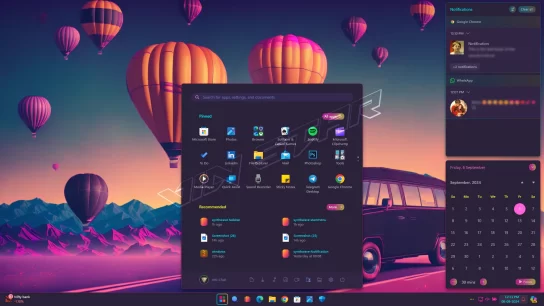
By following these steps, you can easily transform your Windows 11 Start Menu to resemble the modern and sleek Windows 11X concept style. This customization not only enhances the visual appeal but also provides a refreshed user experience, making your Start Menu more enjoyable and functional.
power button doesn’t
show
hey where is mod setting? that i can paste?
you can paste in windhawk start menu styler mod advance 🙂
How do you get the folder icons to show under the pinned apps? i cant get them to show when using this
If you want narrower corner radius change CornerRadius=30 to CornerRadius=15
How to reduce rounded corners
If you want narrower corner radius change CornerRadius=30 to CornerRadius=15
doesn’t show at all
Love your work. Thanks you. just wondering is it possible to increase the height or weight of the start menu?
The power button doesn’t show up at all.
bro try “controlStyles[11].styles[0]”: “Margin=0,-1080,-10,0”,
change the margin value 1080 workes for me
Thank you
Man there is even a light smooth animation when opening AWESOME!