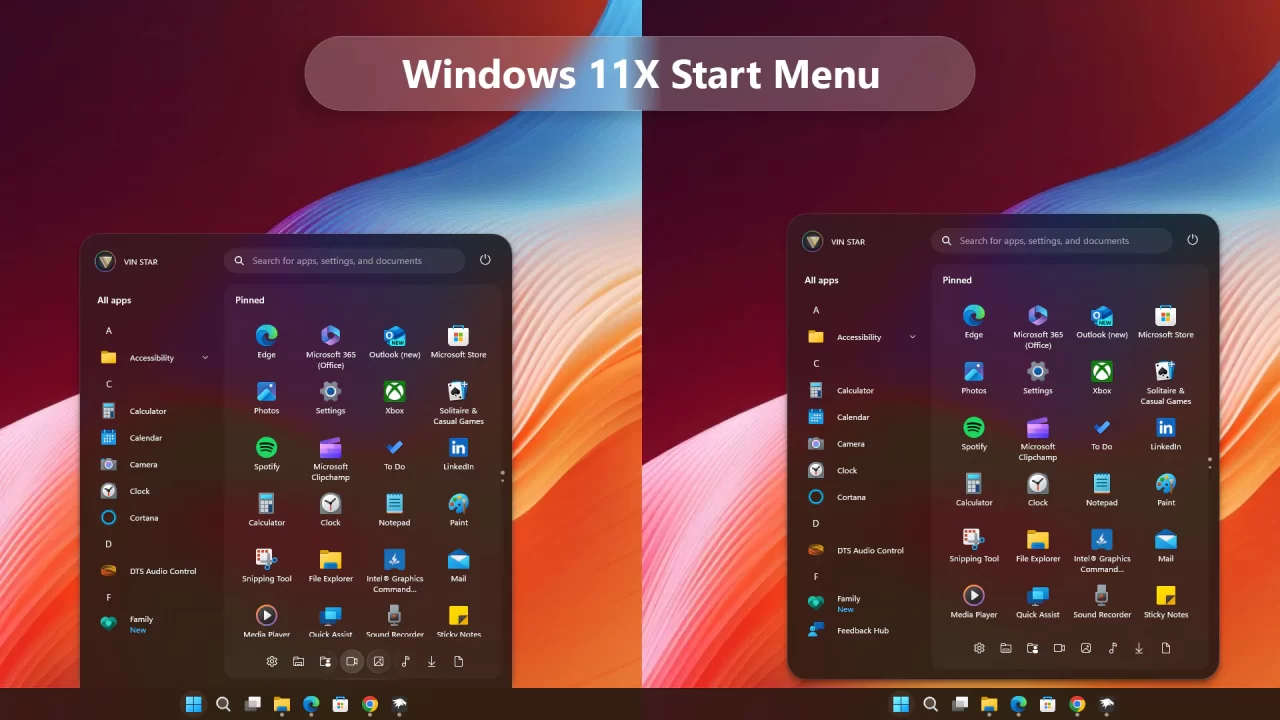
Windows 11X Start Menu for Windows 11
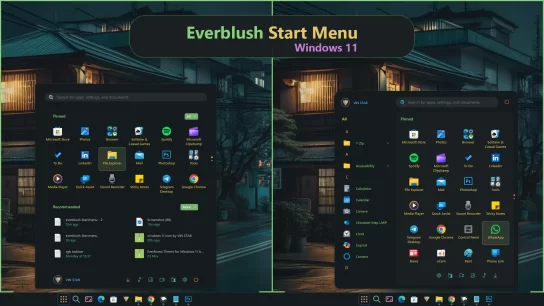
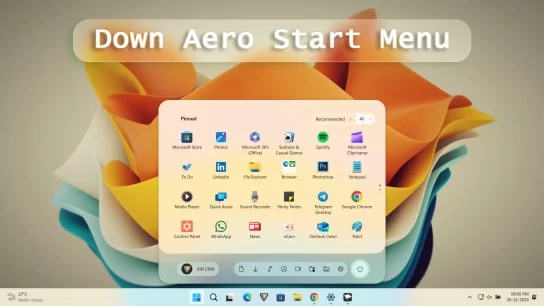
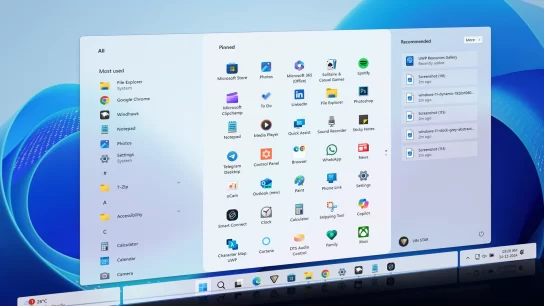
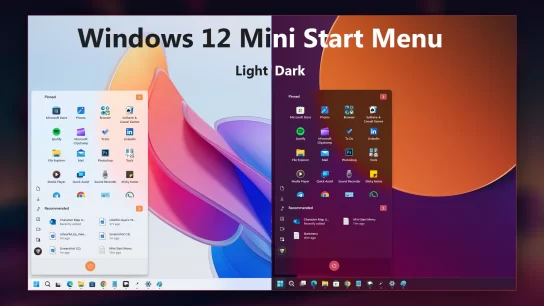
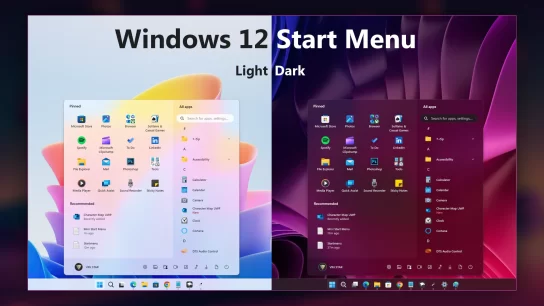
Transform your Windows 11 Start Menu to achieve a sleek Windows 11X look by following these simple steps using the Windows 11 Start Menu Styler Windhawk mod. This guide will walk you through the installation and customization process to enhance your Start Menu’s appearance effortlessly.
Steps to Install Windhawk and the Mod:
- Download and install Windhawk.
- Open Windhawk and go to “Explore” in the upper right menu.
- Search for “Windows 11 Start Menu Styler” and click “Details.”
- Click “Install” and accept any pop-ups.
- After installing the mod:
Open the “Settings” tab → paste the YAML-formatted code into “Textual mode” or
Open the “Advanced” tab → paste the JSON-formatted code into “Mod settings”
Windows 11X Start Menu
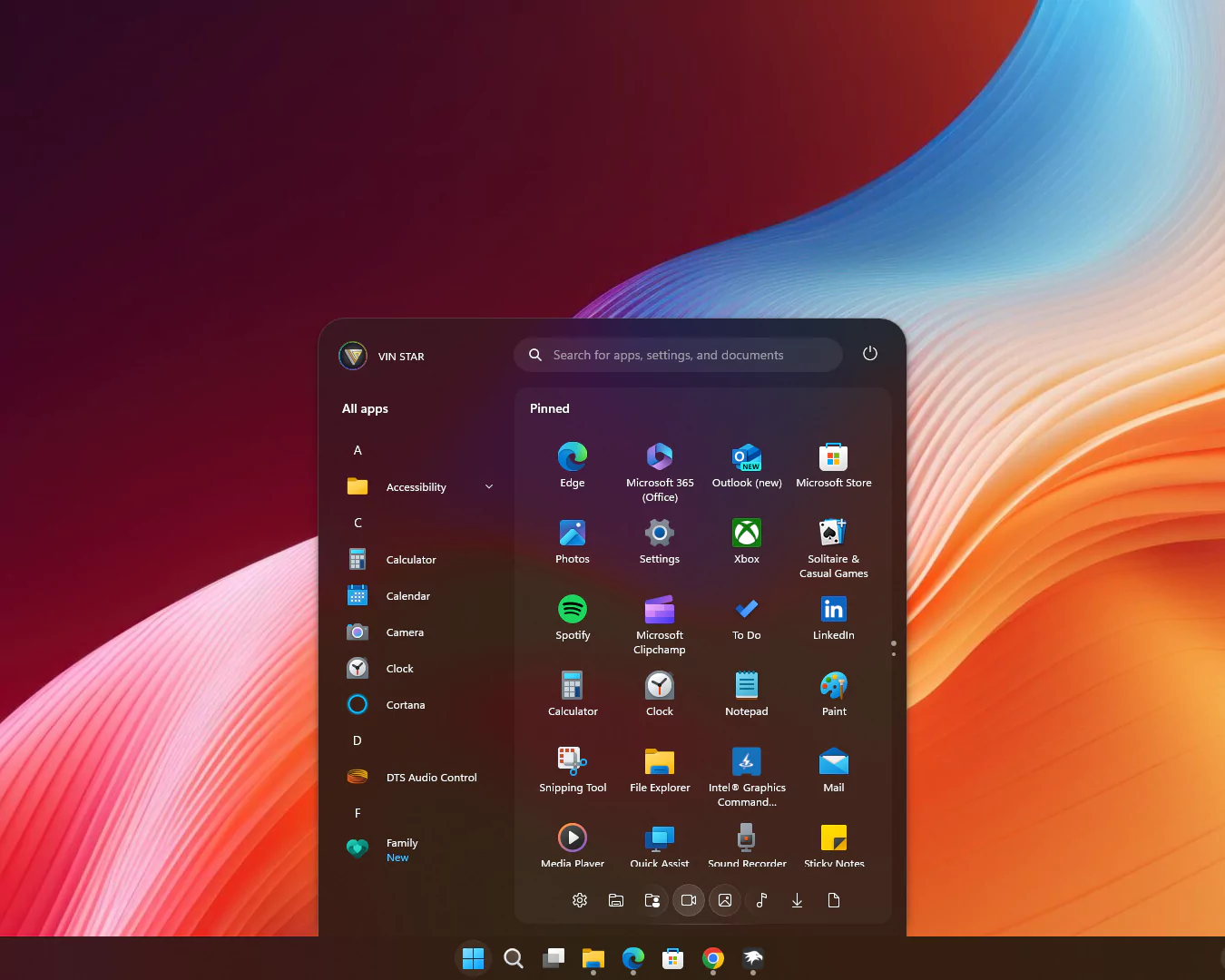
theme: VinStar
disableNewStartMenuLayout: legacyClassicLayout
styleConstants:
  - Background=<RevealBorderBrush Color="Transparent" TargetTheme="1" Opacity="0.3"/>
  - BorderBrush=<RevealBorderBrush Color="Transparent" TargetTheme="1" Opacity="0.8"/>
  - BorderThickness=1
  - CornerRadius=99
  - CornerRadius2=20
  - CornerRadius3=30,30,0,0
  - FlowDirection=0
  - Margin=2
  - Margin2=0,0,0,-15
  - Visibility=Visible
  - Visibility2=Collapsed
controlStyles:
  - target: Windows.UI.Xaml.Controls.Grid#UndockedRoot
    styles:
      - Margin=200,-10,0,0
      - Visibility=$Visibility
      - Width=450
  - target: Windows.UI.Xaml.Controls.Grid#AllAppsRoot
    styles:
      - Margin=180,0,-220,0
      - Transform3D:=<CompositeTransform3D TranslateX="-1100" />
      - Visibility=$Visibility
      - Width=290
  - target: Windows.UI.Xaml.Controls.Button#CloseAllAppsButton
    styles:
      - Visibility=$Visibility2
  - target: StartDocked.StartSizingFrame
    styles:
      - MaxHeight=670
      - MaxWidth=650
      - MinWidth=650
  - target: Windows.UI.Xaml.Controls.Grid#ShowMoreSuggestions
    styles:
      - Visibility=$Visibility2
  - target: Windows.UI.Xaml.Controls.Button#ShowAllAppsButton
    styles:
      - Visibility=$Visibility2
  - target: Windows.UI.Xaml.Controls.GridView#RecommendedList > Windows.UI.Xaml.Controls.Border > Windows.UI.Xaml.Controls.ScrollViewer#ScrollViewer > Windows.UI.Xaml.Controls.Border#Root > Windows.UI.Xaml.Controls.Grid > Windows.UI.Xaml.Controls.ScrollContentPresenter#ScrollContentPresenter > Windows.UI.Xaml.Controls.ItemsPresenter > Windows.UI.Xaml.Controls.ItemsWrapGrid > Windows.UI.Xaml.Controls.GridViewItem
    styles:
      - Margin=0,0,0,0
      - MaxWidth=190
      - MinWidth=190
  - target: StartDocked.AllAppsGridListView#AppsList
    styles:
      - Padding=90,3,6,16
  - target: Windows.UI.Xaml.Controls.Grid#AllAppsPaneHeader
    styles:
      - Margin=97,-10,0,0
  - target: Windows.UI.Xaml.Controls.Grid#SuggestionsParentContainer
    styles:
      - Margin=-20,0,0,0
      - Visibility=$Visibility2
  - target: StartDocked.NavigationPaneView#NavigationPane
    styles:
      - FlowDirection=$FlowDirection
      - Margin=30,0,30,0
  - target: StartDocked.PowerOptionsView
    styles:
      - CornerRadius=$CornerRadius
      - Margin=0,-1196,-10,0
  - target: Windows.UI.Xaml.Controls.ItemsStackPanel
    styles:
      - FlowDirection=1
  - target: Windows.UI.Xaml.Controls.ListViewItem
    styles:
      - FlowDirection=$FlowDirection
  - target: Windows.UI.Xaml.Controls.ItemsStackPanel > Windows.UI.Xaml.Controls.ListViewItem
    styles:
      - FlowDirection=$FlowDirection
  - target: StartDocked.SearchBoxToggleButton#StartMenuSearchBox
    styles:
      - Margin=23,-101,23,-514
  - target: Windows.UI.Xaml.Controls.TextBlock#NoSuggestionsWithoutSettingsLink
    styles:
      - Margin=11,0,48,0
  - target: StartDocked.LauncherFrame > Windows.UI.Xaml.Controls.Grid#RootGrid > Windows.UI.Xaml.Controls.Grid#RootContent > Windows.UI.Xaml.Controls.Grid#MainContent > Windows.UI.Xaml.Controls.Grid#InnerContent > Windows.UI.Xaml.Shapes.Rectangle
    styles:
      - Margin=67,7,0,21
  - target: Windows.UI.Xaml.Controls.SemanticZoom#ZoomControl
    styles:
      - IsZoomOutButtonEnabled=true
  - target: Windows.UI.Xaml.Controls.Button#ZoomOutButton > Windows.UI.Xaml.Controls.ContentPresenter#ContentPresenter > Windows.UI.Xaml.Controls.TextBlock
    styles:
      - Text=
  - target: Windows.UI.Xaml.Controls.Button#ZoomOutButton
    styles:
      - Background=Transparent
      - BorderBrush=Transparent
      - CornerRadius=4
      - FontSize=14
      - Height=28
      - Margin=0,-36,10,0
      - VerticalAlignment=0
      - Width=28
  - target: Windows.UI.Xaml.Controls.ListView#ZoomAppsList
    styles:
      - Padding=86,0,27,0
  - target: StartDocked.SearchBoxToggleButton
    styles:
      - CornerRadius=$CornerRadius2
      - Height=38
      - Margin=215,-10,70,30
  - target: StartMenu.PinnedList
    styles:
      - Height=480
  - target: Windows.UI.Xaml.Controls.TextBlock#PinnedListHeaderText
    styles:
      - Margin=-30,0,0,0
      - Visibility=$Visibility
  - target: Windows.UI.Xaml.Controls.Grid#TopLevelSuggestionsListHeader
    styles:
      - Visibility=$Visibility2
  - target: Windows.UI.Xaml.Controls.Border#ContentBorder > Windows.UI.Xaml.Controls.Grid#DroppedFlickerWorkaroundWrapper > Border@CommonStates
    styles:
      - Background:=$Background
      - BorderBrush:=$BorderBrush
      - BorderBrush@Active:=<RevealBorderBrush Color="White" TargetTheme="1" Opacity="0.3"/>
      - Margin=1
  - target: Windows.UI.Xaml.Controls.Border#ContentBorder > Windows.UI.Xaml.Controls.Grid#DroppedFlickerWorkaroundWrapper > Border#BackgroundBorder
    styles:
      - Background:=<RevealBorderBrush Color="Transparent" TargetTheme="0" Opacity=".1"/>
      - Margin=$Margin
  - target: Rectangle[4]
    styles:
      - Margin=0,-20,0,0
  - target: Border#AcrylicBorder
    styles:
      - BorderThickness=1,1,1,0
      - CornerRadius=$CornerRadius3
      - Margin=$Margin2
  - target: Border#AcrylicOverlay
    styles:
      - BorderBrush:=$BorderBrush
      - BorderThickness=$BorderThickness
      - CornerRadius=15
      - Margin=215,75,15,-64
  - target: Border#DropShadow
    styles:
      - CornerRadius=$CornerRadius3
      - Margin=$Margin2
  - target: Border#DropShadowDismissTarget
    styles:
      - CornerRadius=$CornerRadius3
      - Margin=$Margin2
  - target: StartDocked.PowerOptionsView > StartDocked.NavigationPaneButton > Grid > Border
    styles:
      - CornerRadius=$CornerRadius
      - Margin=2,3,2,0
  - target: StartDocked.UserTileView
    styles:
      - Margin=-20,-1190,0,0
  - target: StartDocked.UserTileView > StartDocked.NavigationPaneButton > Grid > Border
    styles:
      - CornerRadius=$CornerRadius2
      - Margin=8,0,0,0
  - target: StartDocked.SearchBoxToggleButton > Grid > Border
    styles:
      - Background=#11ffffff
  - target: StartDocked.LauncherFrame > Grid#RootGrid > Grid#RootContent > Grid#MainContent > Grid#InnerContent > Rectangle
    styles:
      - Visibility=$Visibility2
  - target: StartDocked.NavigationPaneView
    styles:
      - Height=50
  - target: StartDocked.AppListView#NavigationPanePlacesListView
    styles:
      - Margin=0,10,0,0
  - target: StartDocked.AppListViewItem > Grid
    styles:
      - Background:=$Background
      - BorderBrush:=<RevealBorderBrush Color="Transparent" TargetTheme="1" Opacity="1"/>
      - BorderThickness=$BorderThickness
      - Margin=$Margin
  - target: StartDocked.AppListViewItem > Grid#ContentBorder@CommonStates
    styles:
      - CornerRadius=$CornerRadius2
  - target: MenuFlyoutPresenter
    styles:
      - BorderBrush:=$BorderBrush
      - BorderThickness=$BorderThickness
  - target: Windows.UI.Xaml.Controls.FlyoutPresenter[1]
    styles:
      - Transform3D:=<CompositeTransform3D  TranslateX="50"/>
Paste the code into the Settings > Textual Mode.
Windows 11X Float Start Menu
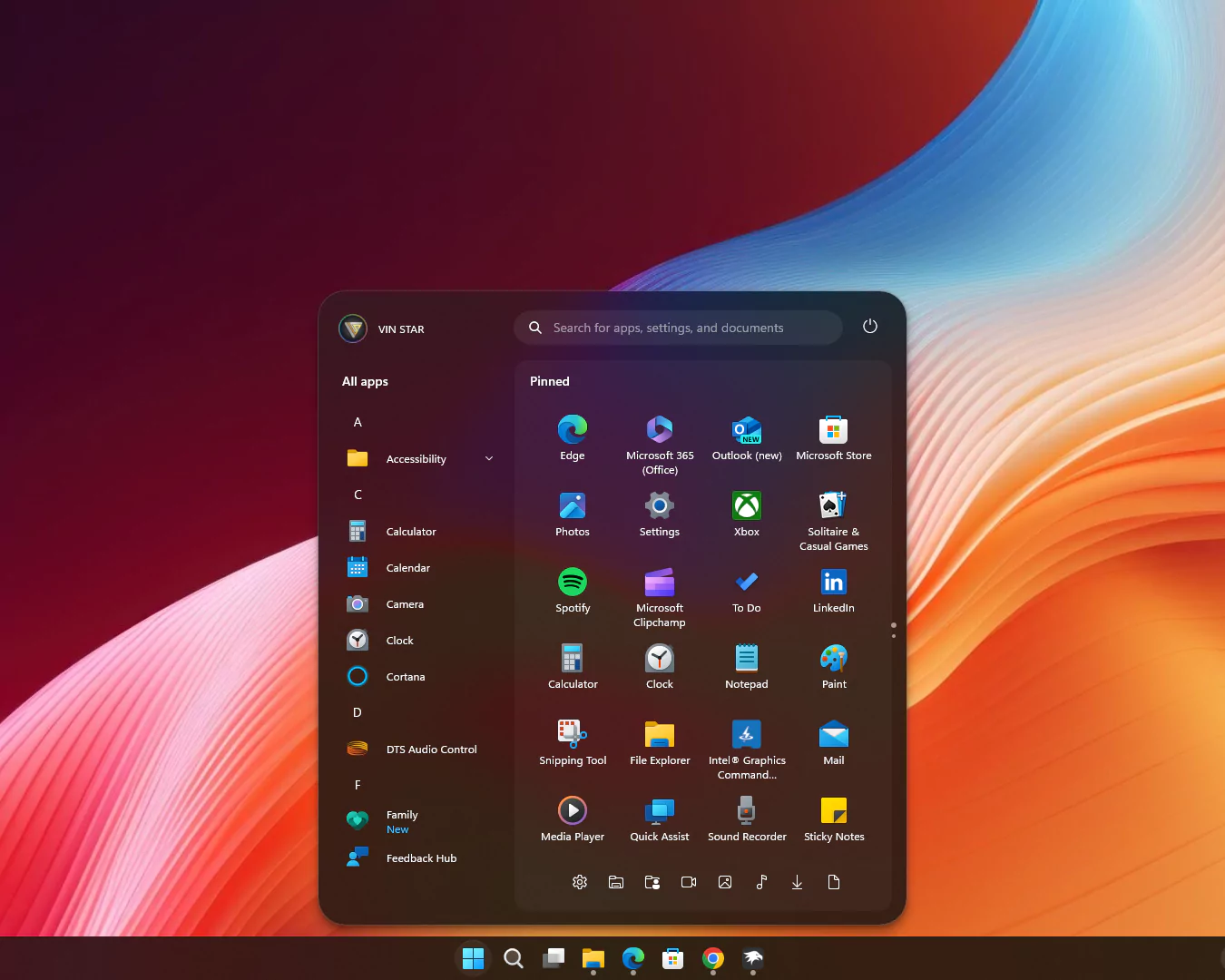
theme: VinStar
disableNewStartMenuLayout: legacyClassicLayout
styleConstants:
  - Background=<RevealBorderBrush Color="Transparent" TargetTheme="1" Opacity="0.3"/>
  - BorderBrush=<RevealBorderBrush Color="Transparent" TargetTheme="1" Opacity="0.8"/>
  - BorderThickness=1
  - CornerRadius=99
  - CornerRadius2=20
  - CornerRadius3=30
  - FlowDirection=0
  - Margin=2
  - Margin2=0
  - Visibility=Visible
  - Visibility2=Collapsed
controlStyles:
  - target: Windows.UI.Xaml.Controls.Grid#UndockedRoot
    styles:
      - Margin=200,-10,0,0
      - Visibility=$Visibility
      - Width=450
  - target: Windows.UI.Xaml.Controls.Grid#AllAppsRoot
    styles:
      - Margin=180,0,-220,0
      - Transform3D:=<CompositeTransform3D TranslateX="-1100" />
      - Visibility=$Visibility
      - Width=290
  - target: Windows.UI.Xaml.Controls.Button#CloseAllAppsButton
    styles:
      - Visibility=$Visibility2
  - target: StartDocked.StartSizingFrame
    styles:
      - MaxHeight=700
      - MaxWidth=650
      - MinWidth=650
  - target: Windows.UI.Xaml.Controls.Grid#ShowMoreSuggestions
    styles:
      - Visibility=$Visibility2
  - target: Windows.UI.Xaml.Controls.Button#ShowAllAppsButton
    styles:
      - Visibility=$Visibility2
  - target: Windows.UI.Xaml.Controls.GridView#RecommendedList > Windows.UI.Xaml.Controls.Border > Windows.UI.Xaml.Controls.ScrollViewer#ScrollViewer > Windows.UI.Xaml.Controls.Border#Root > Windows.UI.Xaml.Controls.Grid > Windows.UI.Xaml.Controls.ScrollContentPresenter#ScrollContentPresenter > Windows.UI.Xaml.Controls.ItemsPresenter > Windows.UI.Xaml.Controls.ItemsWrapGrid > Windows.UI.Xaml.Controls.GridViewItem
    styles:
      - Margin=0,0,0,0
      - MaxWidth=190
      - MinWidth=190
  - target: StartDocked.AllAppsGridListView#AppsList
    styles:
      - Padding=90,3,6,16
  - target: Windows.UI.Xaml.Controls.Grid#AllAppsPaneHeader
    styles:
      - Margin=97,-10,0,0
  - target: Windows.UI.Xaml.Controls.Grid#SuggestionsParentContainer
    styles:
      - Margin=-20,0,0,0
      - Visibility=$Visibility2
  - target: StartDocked.NavigationPaneView#NavigationPane
    styles:
      - FlowDirection=$FlowDirection
      - Margin=30,0,30,0
  - target: StartDocked.PowerOptionsView
    styles:
      - CornerRadius=$CornerRadius
      - Margin=0,-1256,-10,0
  - target: Windows.UI.Xaml.Controls.ItemsStackPanel
    styles:
      - FlowDirection=1
  - target: Windows.UI.Xaml.Controls.ListViewItem
    styles:
      - FlowDirection=$FlowDirection
  - target: Windows.UI.Xaml.Controls.ItemsStackPanel > Windows.UI.Xaml.Controls.ListViewItem
    styles:
      - FlowDirection=$FlowDirection
  - target: StartDocked.SearchBoxToggleButton#StartMenuSearchBox
    styles:
      - Margin=23,-101,23,-514
  - target: Windows.UI.Xaml.Controls.TextBlock#NoSuggestionsWithoutSettingsLink
    styles:
      - Margin=11,0,48,0
  - target: StartDocked.LauncherFrame > Windows.UI.Xaml.Controls.Grid#RootGrid > Windows.UI.Xaml.Controls.Grid#RootContent > Windows.UI.Xaml.Controls.Grid#MainContent > Windows.UI.Xaml.Controls.Grid#InnerContent > Windows.UI.Xaml.Shapes.Rectangle
    styles:
      - Margin=67,7,0,21
  - target: Windows.UI.Xaml.Controls.SemanticZoom#ZoomControl
    styles:
      - IsZoomOutButtonEnabled=true
  - target: Windows.UI.Xaml.Controls.Button#ZoomOutButton > Windows.UI.Xaml.Controls.ContentPresenter#ContentPresenter > Windows.UI.Xaml.Controls.TextBlock
    styles:
      - Text=
  - target: Windows.UI.Xaml.Controls.Button#ZoomOutButton
    styles:
      - Background=Transparent
      - BorderBrush=Transparent
      - CornerRadius=4
      - FontSize=14
      - Height=28
      - Margin=0,-36,10,0
      - VerticalAlignment=0
      - Width=28
  - target: Windows.UI.Xaml.Controls.ListView#ZoomAppsList
    styles:
      - Padding=86,0,27,0
  - target: StartDocked.SearchBoxToggleButton
    styles:
      - CornerRadius=$CornerRadius2
      - Height=38
      - Margin=215,-10,70,30
  - target: StartMenu.PinnedList
    styles:
      - Height=500
  - target: Windows.UI.Xaml.Controls.TextBlock#PinnedListHeaderText
    styles:
      - Margin=-30,0,0,0
      - Visibility=$Visibility
  - target: Windows.UI.Xaml.Controls.Grid#TopLevelSuggestionsListHeader
    styles:
      - Visibility=$Visibility2
  - target: Windows.UI.Xaml.Controls.Border#ContentBorder > Windows.UI.Xaml.Controls.Grid#DroppedFlickerWorkaroundWrapper > Border@CommonStates
    styles:
      - Background:=$Background
      - BorderBrush:=$BorderBrush
      - BorderBrush@Active:=<RevealBorderBrush Color="White" TargetTheme="1" Opacity="0.3"/>
      - Margin=1
  - target: Windows.UI.Xaml.Controls.Border#ContentBorder > Windows.UI.Xaml.Controls.Grid#DroppedFlickerWorkaroundWrapper > Border#BackgroundBorder
    styles:
      - Background:=<RevealBorderBrush Color="Transparent" TargetTheme="0" Opacity=".1"/>
      - Margin=$Margin
  - target: Rectangle[4]
    styles:
      - Margin=0,-20,0,0
  - target: Border#AcrylicBorder
    styles:
      - BorderThickness=$BorderThickness
      - CornerRadius=$CornerRadius3
      - Margin=$Margin2
  - target: Border#AcrylicOverlay
    styles:
      - BorderBrush:=$BorderBrush
      - BorderThickness=$BorderThickness
      - CornerRadius=15
      - Margin=215,75,15,-50
  - target: Border#DropShadow
    styles:
      - CornerRadius=$CornerRadius3
      - Margin=$Margin2
  - target: Border#DropShadowDismissTarget
    styles:
      - CornerRadius=$CornerRadius3
      - Margin=$Margin2
  - target: StartDocked.PowerOptionsView > StartDocked.NavigationPaneButton > Grid > Border
    styles:
      - CornerRadius=$CornerRadius
      - Margin=2,3,2,0
  - target: StartDocked.UserTileView
    styles:
      - Margin=-20,-1250,0,0
  - target: StartDocked.UserTileView > StartDocked.NavigationPaneButton > Grid > Border
    styles:
      - CornerRadius=$CornerRadius2
      - Margin=8,0,0,0
  - target: StartDocked.SearchBoxToggleButton > Grid > Border
    styles:
      - Background=#11ffffff
  - target: StartDocked.LauncherFrame > Grid#RootGrid > Grid#RootContent > Grid#MainContent > Grid#InnerContent > Rectangle
    styles:
      - Visibility=$Visibility2
  - target: StartDocked.NavigationPaneView
    styles:
      - Height=50
  - target: StartDocked.AppListView#NavigationPanePlacesListView
    styles:
      - Margin=0,-30,0,0
  - target: StartDocked.AppListViewItem > Grid
    styles:
      - Background:=$Background
      - BorderBrush:=<RevealBorderBrush Color="Transparent" TargetTheme="1" Opacity="1"/>
      - BorderThickness=$BorderThickness
      - Margin=$Margin
  - target: StartDocked.AppListViewItem > Grid#ContentBorder@CommonStates
    styles:
      - CornerRadius=$CornerRadius2
  - target: MenuFlyoutPresenter
    styles:
      - BorderBrush:=$BorderBrush
      - BorderThickness=$BorderThickness
  - target: Windows.UI.Xaml.Controls.FlyoutPresenter[1]
    styles:
      - Transform3D:=<CompositeTransform3D TranslateX="50"/>
Paste the code into the Settings > Textual Mode.
Conclusion
By following these steps, you can easily transform your Windows 11 Start Menu to resemble the modern and sleek Windows 11X concept style. This customization not only enhances the visual appeal but also provides a refreshed user experience, making your Start Menu more enjoyable and functional.
the blinking search cursor seems to sit outside of the search window
Its awesome but the redisigh of windows 11 start menu is coming in somebuild of 25h2 so please can you mamke a new one thank you
Is it possible to remove the “all apps” section and leave only the favorites?
a
how to siable 3d effect when hovering the icon, it seems changing some 3d value do nothing
i want to have recommended section, can you help us? thank you
i want to customize background transparency
I could have sworn I’d made a comment about this earlier, but I guess it didn’t get through—as of a more recent Windows update, pinned apps are missing their highlight effect on hover. I wanted to make sure this issue was known.
Also, I can’t seem to type certain capital letters (like I and U) using the shift key on this platform? I’ve been needing to use caps lock for them.
I have a transparent corner that shows outside my corner like my corner is rounded but there is a transparent corner which is rectangle how to fix please
For Border#AcrylicBorder
CornerRadius=20,20,20,20
Margin=0,0,0,0
For Border#DropShadow
CornerRadius=20,20,20,20
Margin=0,0,0,0
is worked for me.
yes thanks
its work
where do i change these values?? which line??
how can i make it more transparent?
I’m here looking for the same, please somebody help us, i’ll be much appreciated
, “controlStyles[31].styles[3]”: “Background:=”,
“controlStyles[32].styles[4]”: “Background:=”
Add this code before “}”